Key Takeaways
- Starting the data audit six months before migration is one of the most reliable ways to stay on schedule. Every week it gets delayed adds risk to the go-live date.
- Lease records are the most difficult part of any real estate ERP data migration. A 150-tenant commercial portfolio can mean 450 or more documents that need careful review and entry.
- A full cutover migration is faster but riskier. A staged migration takes longer but gives teams time to find and fix problems before they affect live operations.
- Data quality going in determines data quality coming out. No migration approach fixes poor source data.
- Teams that start clean and organized consistently finish faster than those discovering problems mid-migration.
Three weeks before go-live, a controller at a mid-size commercial property company discovered that the lease modification history was not in any system. It was in a filing cabinet, forty-seven paper amendments across eighteen tenants, some going back nine years, and the migration script had no way to read them. The go-live date moved by six weeks.
This happens more often than most teams expect. Lease records, CAM pools, payment history, and entity-level account structures are almost always messier than they appear when a project kicks off.
Real estate ERP data migration requires a different approach from most industries. Lease terms vary by tenant. Revenue recognition depends on contract details. Multi-entity structures mean the same vendor might appear under five different names across five different property books.
Gartner research warns that many organizations plan and execute data migration too late in their ERP projects, leading to data quality issues that directly impact business outcomes. In real estate specifically, the problem goes deeper because of how much critical information lives outside digital systems.
This post covers the data migration strategies for real estate ERP systems that actually work, what to prepare first, and where most teams run into trouble.
What Data Needs to Be Migrated in a Real Estate ERP Migration?
Not all data migrates equally. Some records are clean and well-organized while others are spread across spreadsheets, filing cabinets, and old systems that were never designed with clean data export in mind. Here is what typically needs to move in a real estate software data migration.
Lease Records
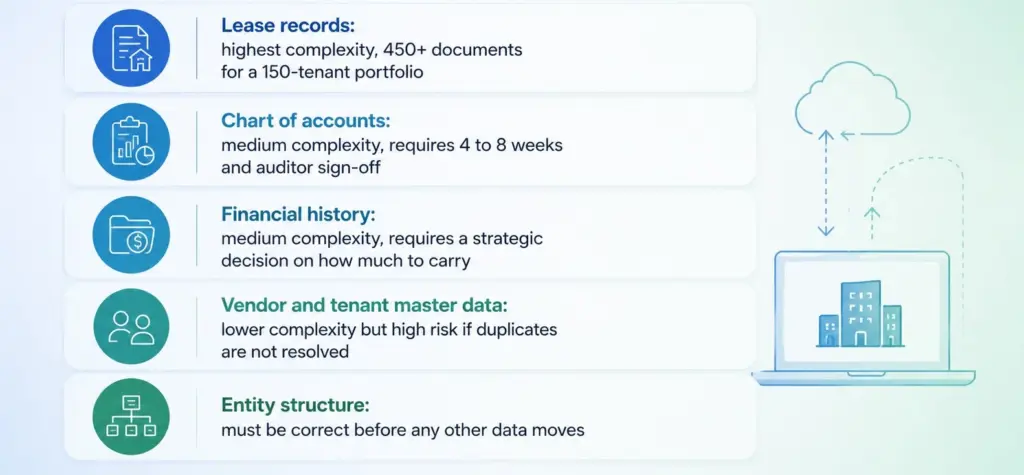
This is the most labor-intensive category. Every active lease needs to be fully reviewed and entered before migration. That means:
- Start and end dates for every lease
- All renewal options and notice requirements
- Base rent amounts and how they escalate over time
- Tenant improvement allowances and any amortization schedules
- Free-rent periods and security deposit terms
- CAM exclusion lists and cap structures
- Every amendment since the original lease was signed
A commercial portfolio with 150 tenants and an average of three amendments each means 450 documents that need to be read and entered accurately. For multi-entity portfolios, managing subsidiaries with separate lease books per entity adds another layer of complexity that has to be mapped before any data moves.
Chart of Accounts
Most real estate organizations have a chart of accounts that grew without a plan. Migration is the right moment to rebuild it properly. This requires the controller, CFO, and auditors to agree on how the business should be organized financially before anything moves. Expect four to eight weeks for this step alone.
Financial History
Every migration needs a decision on how much history to carry over. The standard approach is to migrate a trial balance at the cutover date and keep older transactions in the legacy system. Make this decision with the CFO and document it. Investors, lenders, and auditors will ask for historical data for years after cutover.
Vendor and Tenant Master Data
The same vendor often appears under three different names depending on who entered the invoice. Tenant records carry the same problem. Resolve all duplicates and set a naming convention before the migration runs. Every duplicate that makes it into the new system creates reconciliation errors that take weeks to fix.
How Do You Clean Data Before Migrating to a New Real Estate ERP?
Data cleaning means fixing problems in the source data before the migration begins. It is not something that happens during migration or after go-live. The earlier it starts, the fewer surprises appear at cutover.
Here is a simple approach, step by step:
1. Find every data source
Before cleaning anything, map where the data actually lives. Most portfolios have more sources than expected: the current property management platform, a separate accounting system, lease tracking spreadsheets, paper files for older amendments, and email threads with approvals that were never formally entered anywhere.
2. Fix duplicate records
Run a check for duplicate vendors, tenants, and properties. Set clear naming rules. Every duplicate that goes into the new system causes reconciliation failures that take time to untangle. Getting the contract management structure right before migration means lease terms post directly to financial records rather than requiring manual fixes afterward.
3. Abstract and validate lease records
Lease abstraction is not a data entry task. It needs someone who understands lease accounting to read each document and interpret the financial terms correctly. For large portfolios, this should be a dedicated workstream with its own timeline, not a task folded into the general migration effort.
4. Decide what stays in the old system
Not everything needs to move. Decide explicitly what stays in the legacy system and document that decision with the CFO and auditors. A choice made quietly during migration becomes a problem when someone asks for data six months later.
5. Validate against the new system’s requirements
Before extraction begins, check that the source data matches the format and structure the new system expects. Schema mismatches discovered during migration cause the same kind of delays as poor data quality.
What Is the Difference Between a Full Cutover and a Staged ERP Migration?
These are the two main data migration strategies for real estate ERP systems. A full cutover means everything moves at once on a single date. A staged migration means data and features move in phases over several months.
Neither is always better. The right choice depends on how complex the portfolio is and how much capacity the team has to manage the transition.
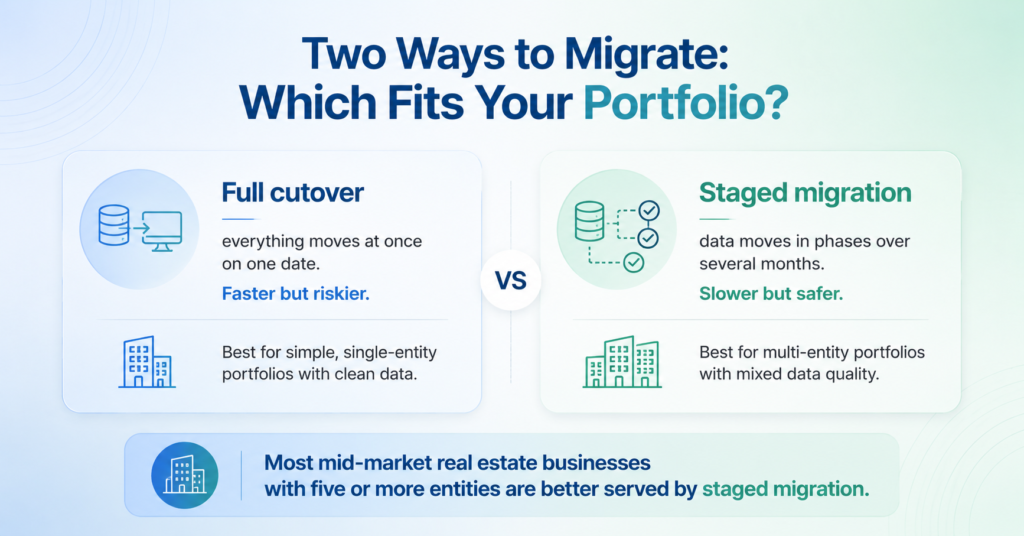
Full cutover works well when:
- The portfolio has one or two entities
- Records are clean and well-organized going in
- The team has dedicated implementation support throughout
Risk: If something breaks at go-live, there is no fallback. The team manages live operations and a migration problem at the same time.
Staged migration works well when:
- The portfolio runs through multiple entities
- Data quality varies across different categories
- The team cannot manage a complete cutover alongside daily operations
Risk: Running two systems at the same time is expensive in both staff hours and software cost. Each phase needs clear completion criteria or it will extend indefinitely.
Most mid-market real estate businesses with five or more entities and mixed data quality are better served by a staged approach. The Eckelkamp case study shows how stabilizing the financial layer first, before moving lease administration, reduced the total number of issues found after go-live.
What Are the Steps in Real Estate ERP Migration Planning?
ERP migration planning for real estate follows a clear sequence. Most teams either rush through it or skip steps, and that is the most reliable predictor of a delayed go-live.
| Step | When | What Happens |
| Data audit | 6 months before | Map every source, find duplicates, check lease completeness |
| Chart of accounts redesign | 4 to 5 months before | Controller, CFO, and auditors agree on the new structure |
| Entity setup | 4 months before | Build entity hierarchy in new system before extraction starts |
| Data extraction | 3 months before | Pull from source, convert to fit new format, validate |
| Test migration | 6 to 8 weeks before | Run full migration in a test environment and fix all gaps |
| Parallel run | 4 weeks before | Run both systems together until two month-end closes match |
| Go-live | Day 0 | Live migration, legacy system stays read-only for 90 days |
What Are the Most Common Real Estate ERP Migration Mistakes?
These problems appear consistently across real estate ERP projects. Knowing them in advance is the best way to avoid them.
Lease records with gaps: Paper amendments that were never scanned, verbal changes that were never written down, renewal notices in personal email inboxes instead of a shared system. Find these before anything else moves.
Chart of accounts rebuilt halfway through: When the account structure is rushed or designed without the auditors, it almost always needs to be redone once real data loads and the reports do not balance. Every rebuild costs weeks.
Duplicate records creating errors: A vendor listed three different ways means invoices cannot match automatically. These problems are invisible in the old system and immediately obvious in the new one.
Stopping the parallel run too early: Running old and new systems side by side is expensive in staff time. Teams cut it short and then find problems after go-live. Two clean month-end closes in the new system is the minimum before stopping.
Entity structure wrong at cutover: Fixing how entities are organized after go-live is one of the most expensive corrections in any ERP project. Getting the document management structure right for each entity before migration begins avoids losing critical files between phases.
Real Estate ERP Migration Checklist
Six months before go-live:
- Assign a dedicated owner for the data audit
- Map every data source including paper files
- Begin lease abstraction for all active leases
Three to four months before:
- Finalize chart of accounts with controller and auditors
- Resolve all vendor and tenant duplicates
- Confirm entity structure with legal and finance teams
After go-live:
- Keep the legacy system read-only for at least 90 days
- Do not end the parallel run until two consecutive month-end closes match
- Track reconciliation errors weekly for the first three months
Frequently Asked Questions
How long does a real estate ERP data migration take?
For a mid-market portfolio with five to twenty entities, the migration workstream typically runs four to six months on its own. The full project including planning, configuration, testing, and go-live usually takes ten to sixteen months.
What is the biggest risk in real estate ERP data migration?
Lease records with gaps are the most common problem. Paper amendments, undocumented changes, and renewal notices stored in personal email inboxes only surface when the new system tries to calculate rent or CAM charges.
Should we do a full cutover or a staged migration?
A staged migration is lower risk for most mid-market real estate businesses. It lets teams stabilize one area before moving to the next. A full cutover works when data is clean and the portfolio is relatively simple.
How much does real estate ERP data migration cost?
Most teams budget ten to fifteen percent of total implementation cost for migration. The actual effort consistently runs twenty-five to forty percent. The gap comes from underestimating lease abstraction time and the chart of accounts redesign.
What data should we prioritize first?
Start with the chart of accounts and entity structure. Everything else maps to these two. Getting them wrong means remapping everything that follows.
Plan Earlier Than You Think Necessary
The real estate ERP migration teams that finish on schedule almost always started earlier than felt necessary. Choosing the right data migration strategies for real estate ERP systems and starting the data audit, the lease abstraction, and the chart of accounts redesign well before the project kicks off is the single most effective thing a team can do to protect the timeline.
If the portfolio is approaching a migration, the most useful first step is understanding what the data actually looks like today and what it needs before the move begins.
Talk to Propertese about what data migration strategies for real estate ERP systems look like for a portfolio at your stage.