Efficient property maintenance separates successful property managers from overwhelmed ones. With maintenance emergencies, tenant requests, vendor coordination, and compliance requirements, property maintenance management systems have become essential tools for modern property management.
This guide covers everything property managers need to know about maintenance management software, key features, implementation strategies, and how to choose the right system for your portfolio.
Quick Stats:
- Properties using maintenance software reduce emergency repairs by 35%
- Average time savings: 10-15 hours per week per manager
- Tenant satisfaction increases 40% with request tracking portals
- Preventive maintenance reduces costs by 12-18% annually
- Work order completion time decreases by 30% with automation
What Is a Property Maintenance Management System?
A property maintenance management system is software that centralizes all maintenance operations for property managers. It tracks repairs, manages work orders, and facilitates communication between tenants, vendors, and property managers.
Core Functions
| Function | Description |
| Work Order Management | Create, assign, track repair requests |
| Tenant Portal | Self-service request submission and tracking |
| Vendor Coordination | Manage contractors, track performance |
| Preventive Maintenance | Schedule routine inspections and servicing |
| Digital Records | Centralized maintenance history |
| Cost Tracking | Monitor expenses, budget vs. actuals |
| Mobile Access | Field technicians can update status on-site |
| Automated Notifications | Status updates to all stakeholders |
CMMS vs. Property Maintenance Software
| Feature | CMMS (Computerized Maintenance Management System) | Property Maintenance Software |
| Primary Use | Industrial assets, equipment tracking | Residential/commercial properties |
| Focus | Asset lifecycle, predictive maintenance | Tenant requests, work orders |
| Key Features | Equipment history, parts inventory | Tenant portals, owner reporting |
| Users | Facilities managers, industrial operations | Property managers, landlords |
| Integrations | Manufacturing systems, IoT sensors | Property management platforms |
| Best For | Factories, large facilities | Apartments, commercial buildings |
Property managers should choose property-specific maintenance software rather than generic CMMS systems.
7 Key Benefits of Property Maintenance Management Systems
1. Centralized Record-Keeping
All maintenance records in one digital location:
What You Can Track:
- ✓ Tenant repair requests and work orders
- ✓ Vendor invoices and payment history
- ✓ Maintenance schedules and completion dates
- ✓ Historical repair data by unit/property
- ✓ Recurring issue patterns
- ✓ Equipment warranties and manuals
- ✓ Inspection reports and compliance documents
Example: If a tenant reports frequent plumbing issues, the system shows repair frequency and helps identify problem units for preventive action or equipment replacement.
Project Management: Organize tasks under single projects (unit turnovers, renovations, repairs) with budget tracking against actual expenses.
2. Automated Work Orders & Task Management
How Automation Works:
| Manual Process | Automated Process |
| Tenant calls/emails request | Tenant submits via portal |
| Manager logs in spreadsheet | System auto-creates work order |
| Manager calls vendor | System assigns to preferred vendor |
| Phone tag for updates | Automatic status notifications |
| Manual follow-up needed | System tracks to completion |
| Paper invoicing | Digital invoice attachment |
Work Order Lifecycle:
- Submission – Tenant enters request with photos
- Triage – System categorizes by urgency (emergency/routine)
- Assignment – Routes to appropriate vendor/staff
- Scheduling – Coordinates timing with all parties
- Completion – Vendor updates status, uploads photos
- Approval – Manager reviews and closes
- Payment – Invoice processed and recorded
Time Savings: Reduces work order processing from 20-30 minutes to 2-3 minutes.
3. Improved Tenant Communication
Tenant Portal Features:
| Feature | Benefit |
| 24/7 Request Submission | Tenants report issues anytime |
| Photo/Video Upload | Better problem documentation |
| Real-Time Status Tracking | Transparency reduces complaints |
| Automated Updates | Email/SMS notifications on progress |
| Communication History | Complete request thread in one place |
| Appointment Scheduling | Tenants select convenient times |
| Maintenance History | View past requests and resolutions |
Satisfaction Impact: Transparency increases tenant retention by 15-25% and reduces complaint calls by 60%.
Communication Examples:
- “Your request has been received and assigned to [Vendor]”
- “Technician scheduled for [Date/Time]”
- “Work completed – please confirm satisfaction”
- “Upcoming inspection scheduled for [Date]”
Learn more: Tenant communication best practices
4. Better Vendor Management
Vendor Tracking Capabilities:
| What to Track | Why It Matters |
| Contact Information | Quick access for urgent repairs |
| Work History | See past performance by vendor |
| Response Times | Identify reliable vs. slow vendors |
| Cost Comparison | Find most cost-effective options |
| Quality Ratings | Track tenant/manager feedback |
| Licensing/Insurance | Ensure compliance, avoid liability |
| Specializations | Match vendor to job type |
| Availability | Know who’s available when |
Vendor Performance Metrics:
- Average response time
- Work order completion rate
- Average cost per job type
- Tenant satisfaction scores
- On-time completion percentage
- Warranty work frequency
Preferred Vendor Lists: Set up go-to vendors for specific job types (plumbing, electrical, HVAC) to streamline assignment.
5. Reduced Emergency Repairs
Prevention Strategies:
| Strategy | Implementation | Cost Savings |
| Routine Inspections | Quarterly property walk-throughs | 15-20% reduction |
| Preventive Maintenance | HVAC servicing, filter changes | 25-30% reduction |
| Lifecycle Tracking | Replace before failure | 35-40% reduction |
| Seasonal Prep | Winterization, summer AC checks | 20-25% reduction |
| Tenant Education | Proper equipment use guidance | 10-15% reduction |
Common Preventable Emergencies:
- HVAC failures (regular servicing prevents 70%)
- Water heater leaks (replacement at 8-10 years prevents 80%)
- Roof leaks (annual inspections prevent 60%)
- Plumbing backups (drain maintenance prevents 50%)
- Electrical issues (inspection prevents 40%)
Preventive Maintenance Schedule Example:
| Frequency | Tasks |
| Monthly | HVAC filter changes, fire extinguisher checks |
| Quarterly | HVAC system inspection, gutter cleaning, smoke detector testing |
| Semi-Annual | Roof inspection, pest control, water heater flush |
| Annual | Full property inspection, appliance servicing, exterior painting assessment |
Read more: Property maintenance checklist
6. Cost Control & Budget Management
Financial Tracking Features:
| What You Track | How It Helps |
| Repair Costs by Unit | Identify problem properties |
| Vendor Cost Comparison | Find best pricing |
| Category Spending | Plumbing, HVAC, electrical breakdown |
| Budget vs. Actual | Stay within maintenance budgets |
| Trend Analysis | Predict future expenses |
| Emergency vs. Routine | Measure prevention effectiveness |
Budget Planning:
- Historical data informs annual budgets
- Identify seasonal spending patterns
- Plan for equipment replacement cycles
- Allocate reserves appropriately
- Justify budget increases with data
Average Maintenance Costs by Property Type:
| Property Type | Annual Maintenance Cost |
| Single-Family Home | $3,000-$5,000 (1% of value) |
| Small Multifamily (2-4 units) | $5,000-$10,000 |
| Apartment Building (20-50 units) | $30,000-$75,000 |
| Large Multifamily (100+ units) | $150,000-$400,000 |
| Commercial Property | $2-$4 per sq ft annually |
7. Simplified Compliance & Reporting
Compliance Tracking:
| Requirement | How Software Helps |
| Safety Inspections | Automated scheduling, completion tracking |
| Code Compliance | Document all required maintenance |
| Fair Housing | Track all requests equally, prevent discrimination |
| Insurance Requirements | Prove preventive maintenance performed |
| Audit Preparation | Generate complete maintenance records |
| Warranty Claims | Document service history for claims |
Report Types:
- Maintenance activity summary (by property/unit)
- Cost reports (by category/vendor/time period)
- Vendor performance reports
- Completion time analytics
- Emergency vs. routine ratio
- Tenant satisfaction scores
- Compliance documentation
Audit-Ready Documentation:
- Timestamped work orders
- Photo evidence of conditions
- Vendor credentials and insurance
- Inspection schedules and results
- Safety compliance records
Essential Features in Property Maintenance Software
Must-Have Features
| Feature | Why It’s Essential | What to Look For |
| Work Order Management | Core functionality | Create, assign, track, close work orders easily |
| Mobile Access | Field technicians need updates | Native iOS/Android apps with offline capability |
| Tenant Portal | Self-service reduces calls | User-friendly interface, photo upload, status tracking |
| Vendor Management | Coordinate contractors | Contact database, performance tracking, preferred lists |
| Preventive Maintenance | Reduce emergencies | Recurring task scheduling, automated reminders |
| Cost Tracking | Budget management | Invoice attachment, expense categorization, reporting |
| Communication Tools | Keep stakeholders informed | Automated notifications, messaging, email integration |
| Reporting & Analytics | Data-driven decisions | Customizable reports, dashboard views, export options |
| Integration Capability | Connect with other systems | Property management software, accounting, payments |
| Document Storage | Centralize records | Unlimited storage, photo/PDF upload, organized by unit |
Advanced Features (Nice-to-Have)
| Feature | Benefit | When You Need It |
| Inventory Management | Track parts/supplies | Large portfolios with in-house staff |
| Vendor Bidding | Get competitive quotes | Major projects, cost optimization |
| Smart Home Integration | Remote monitoring | Luxury properties, tech-forward management |
| Predictive Analytics | Forecast maintenance needs | Large portfolios, sophisticated operations |
| Multi-Language Support | Serve diverse tenants | Markets with non-English speakers |
| Custom Workflows | Match your processes | Complex approval hierarchies |
| API Access | Build custom integrations | Tech-savvy teams with specific needs |
Mobile App Capabilities Checklist
✓ Receive and view work orders
✓ Assign work orders to vendors
✓ Update work order status
✓ Upload photos and documents
✓ Conduct property inspections
✓ Access property/unit information
✓ Communication with tenants/vendors
✓ Offline functionality
✓ GPS/mapping for properties
✓ Time tracking for tasks
How to Choose the Right Maintenance Management System
1. Assess Your Portfolio Needs
| Portfolio Size | Recommended Features | Price Range |
| 1-10 Units | Basic work orders, tenant portal | $50-$150/month |
| 11-50 Units | + Vendor management, preventive maintenance | $150-$400/month |
| 51-200 Units | + Advanced reporting, mobile apps, integrations | $400-$1,200/month |
| 200+ Units | + Custom workflows, API access, dedicated support | $1,200-$5,000+/month |
Questions to Ask:
- How many properties and units do you manage?
- How many maintenance staff vs. external vendors?
- What’s your current maintenance request volume?
- Do you need preventive maintenance scheduling?
- What reports do owners require?
- What systems need integration (accounting, payments)?
2. Evaluate Integration Requirements
Key Integrations:
| Integration Type | Purpose | Examples |
| Property Management Software | Unified data management | Buildium, AppFolio, Yardi |
| Accounting Software | Financial reconciliation | QuickBooks, Xero, Sage |
| Payment Processing | Vendor payments | Bill.com, Stripe, PayPal |
| Communication Platforms | Tenant messaging | Twilio, SendGrid, Mailchimp |
| Document Management | File storage | Dropbox, Google Drive, OneDrive |
| Smart Home/IoT | Remote monitoring | Nest, ecobee, SmartThings |
All-in-One vs. Best-of-Breed:
- All-in-One (like Propertese, Buildium): Single platform, seamless data flow, simpler management
- Best-of-Breed: Specialized tools, potentially more features, but requires integration setup
3. Consider User Experience
Who Uses the System:
- Property managers/staff
- Maintenance technicians
- Vendors/contractors
- Tenants
- Property owners
UX Priorities by User:
| User Type | Key UX Needs |
| Property Managers | Dashboard overview, quick work order creation, reporting |
| Technicians | Simple mobile app, offline access, photo upload |
| Vendors | Clear work order details, easy status updates, invoice submission |
| Tenants | Intuitive request submission, status visibility, communication |
| Owners | Financial reports, maintenance summaries, property performance |
Trial Period Checklist:
- Test work order creation and assignment
- Submit requests via tenant portal
- Access and navigate mobile app
- Generate key reports
- Test integration with existing systems
- Evaluate customer support responsiveness
4. Review Pricing Models
Common Pricing Structures:
| Model | How It Works | Best For |
| Per Unit | Monthly fee per unit managed | Growing portfolios |
| Flat Rate | Fixed monthly/annual fee | Predictable budgeting |
| Tiered Pricing | Features unlock at higher tiers | Scale as you grow |
| Per User | Fee per staff member using system | Small teams |
| Usage-Based | Pay per work order/transaction | Variable volume |
Hidden Costs to Watch:
- Setup/onboarding fees
- Data migration charges
- Training costs
- Integration fees
- Premium support tiers
- Additional users beyond base plan
- Mobile app access (some charge extra)
- Storage limits and overage fees
Average Pricing Examples:
- Entry-Level: $50-$150/month (up to 50 units)
- Mid-Market: $150-$500/month (50-200 units)
- Enterprise: $500-$3,000+/month (200+ units)
5. Evaluate Customer Support
Support Options to Consider:
| Support Type | Availability | Response Time |
| Phone Support | Business hours vs. 24/7 | Immediate |
| Email Support | Always available | 24-48 hours |
| Live Chat | Business hours common | Minutes to hours |
| Knowledge Base | Self-service 24/7 | Immediate |
| Video Tutorials | On-demand learning | Immediate |
| Webinars | Scheduled training | Varies |
| Dedicated Account Manager | Enterprise plans | Varies |
Questions to Ask:
- What’s included in base support vs. premium tiers?
- Average response time for issues?
- Onboarding and training provided?
- Implementation assistance available?
- Community forum or user groups?
Implementation Best Practices
Phase 1: Preparation (2-4 weeks)
Tasks:
- Audit current maintenance processes
- Document all properties, units, equipment
- Gather vendor contact information and credentials
- Review historical maintenance data for migration
- Define user roles and permissions
- Set up integration requirements
- Create custom fields/categories if needed
Data to Prepare:
- Property addresses and unit details
- Equipment lists with make/model/serial numbers
- Vendor database with contact info
- Past 12 months of maintenance records
- Current preventive maintenance schedules
- Existing work order templates
Phase 2: System Setup (1-2 weeks)
Configuration Steps:
- Property Setup: Add all properties and units
- User Accounts: Create accounts for staff, vendors, tenants
- Vendor Database: Import vendor information
- Work Order Categories: Define request types and priorities
- Preventive Maintenance: Schedule recurring tasks
- Notification Settings: Configure alerts and reminders
- Templates: Create work order and inspection templates
- Integrations: Connect accounting, payment systems
Phase 3: Training (1-2 weeks)
Training by User Type:
| User Group | Training Focus | Duration |
| Property Managers | Full system functionality | 2-4 hours |
| Maintenance Staff | Mobile app, work order updates | 1-2 hours |
| Vendors | Portal access, status updates | 30-60 min |
| Tenants | Portal usage, request submission | 15-30 min |
| Owners | Report access, dashboard viewing | 30-60 min |
Training Methods:
- Live webinars for staff
- Video tutorials for self-paced learning
- Written guides and checklists
- Hands-on practice with test data
- Q&A sessions
Phase 4: Launch (1-2 weeks)
Soft Launch Strategy:
- Start with 1-2 pilot properties
- Process all new requests through system
- Continue old system in parallel temporarily
- Monitor for issues and user feedback
- Adjust workflows as needed
- Gradually add more properties
Communication Plan:
- Announce to tenants 2 weeks before launch
- Provide portal access instructions
- Send vendor notification emails
- Post signage in properties
- Offer phone support during transition
Phase 5: Optimization (Ongoing)
Monthly Reviews:
- Work order completion times
- Tenant satisfaction scores
- Vendor performance metrics
- Cost trends and budget variance
- System adoption rates
Quarterly Improvements:
- Review and update preventive maintenance schedules
- Refine work order categories
- Update vendor preferred lists
- Optimize notification settings
- Train on underutilized features
Property Type-Specific Considerations
Residential Property Maintenance
Residential property management requires tenant-focused features:
Priorities:
- User-friendly tenant portal
- Quick response to habitability issues
- Preventive maintenance for appliances
- Unit turnover coordination
- Compliance with residential codes
Common Work Order Types:
- Appliance repairs
- HVAC issues
- Plumbing problems
- Electrical issues
- Pest control
- Lock/key requests
Commercial Property Maintenance
Commercial property management has different needs:
Priorities:
- Extended vendor network
- After-hours emergency service
- CAM charge tracking
- Tenant improvement coordination
- Multi-tenant coordination
Common Work Order Types:
- HVAC system maintenance
- Parking lot repairs
- Common area cleaning
- Elevator servicing
- Fire system inspections
- Roof maintenance
Learn more: CAM reconciliation
Affordable Housing Maintenance
Affordable housing has compliance requirements:
Priorities:
- REAC inspection preparation
- Unit inspection scheduling
- Compliance documentation
- Work order response times
- Fair housing compliance
Inspection Standards:
- HUD/REAC physical inspections
- Annual unit inspections
- Move-in/move-out inspections
- Health and safety compliance
Student Housing Maintenance
Student housing has unique seasonal patterns:
Priorities:
- High-volume request handling
- Rapid unit turnover (summer)
- Preventive maintenance between semesters
- Common area maintenance
- Security system management
Peak Periods:
- Move-in: August/September
- Winter break: December/January
- Move-out: May/June
- Summer turnovers: June/July
Maintenance Management KPIs to Track
| KPI | What It Measures | Target Benchmark |
| Average Response Time | Time from request to assignment | < 24 hours |
| Average Completion Time | Time from request to resolution | < 5 days (non-emergency) |
| Emergency Response Rate | % of emergencies addressed < 4 hours | > 95% |
| Preventive Maintenance Ratio | Preventive vs. reactive repairs | 30-40% preventive |
| Tenant Satisfaction | Portal ratings/surveys | > 4.0/5.0 |
| Work Order Backlog | Open work orders > 30 days old | < 5% |
| Cost per Unit | Annual maintenance spend per unit | Varies by property type |
| Vendor Performance | On-time completion rate | > 90% |
| First-Time Fix Rate | Issues resolved on first visit | > 80% |
| Budget Variance | Actual vs. budgeted maintenance costs | ± 10% |
Common Implementation Challenges & Solutions
| Challenge | Solution |
| Staff Resistance to Change | Involve staff in selection process; emphasize time savings; provide thorough training |
| Low Tenant Adoption | Incentivize portal use; make it easier than calling; send regular reminders |
| Vendor Pushback | Start with tech-savvy vendors; show time savings; offer training; make it mandatory for new vendors |
| Data Migration Issues | Start with current data; migrate historical selectively; accept some manual entry initially |
| Integration Problems | Test thoroughly before launch; work with vendor support; consider phased integration |
| Poor Mobile Connectivity | Choose app with offline mode; provide tablets with cellular; use property WiFi |
| Incomplete Work Orders | Require photos; use checklists; train on importance of detail; review incomplete orders |
| Notification Overload | Customize notification settings by role; use digest emails; prioritize critical alerts only |
Future Trends in Maintenance Management
Emerging Technologies:
| Trend | Impact | Timeline |
| IoT Sensors | Predictive maintenance, leak detection | Now-2 years |
| AI/Machine Learning | Automatic issue diagnosis, cost prediction | 1-3 years |
| Smart Building Integration | Remote monitoring, automated adjustments | Now-2 years |
| AR/VR for Training | Technician training, remote assistance | 2-4 years |
| Blockchain for Compliance | Immutable maintenance records | 3-5 years |
| Drone Inspections | Roof/exterior assessments | Now-2 years |
| Chatbot Support | AI-powered tenant support | Now-1 year |
Propertese Maintenance Management Solution
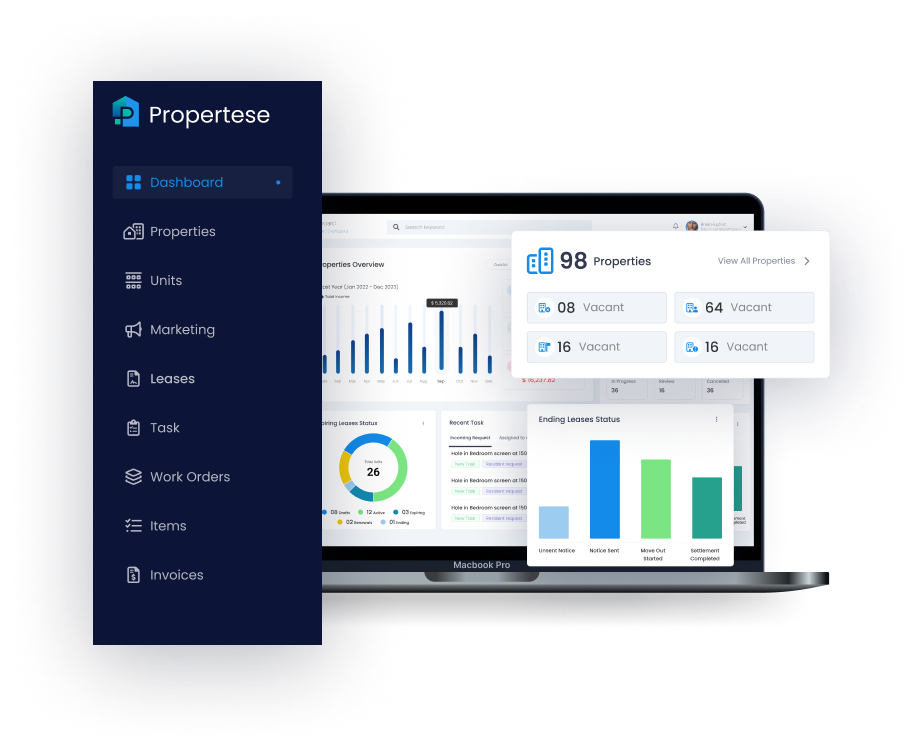
Propertese provides comprehensive maintenance request management integrated with full property management capabilities:
Key Features:
- Automated Work Orders: Tenant requests automatically create work orders
- Mobile-First Design: Field technicians update status on-site
- Vendor Portal: Contractors access assignments, update progress
- Preventive Maintenance: Schedule recurring tasks automatically
- Financial Integration: Link maintenance costs to property accounting
- Tenant Portal: 24/7 request submission with photo upload
- Real-Time Notifications: Email/SMS updates to all stakeholders
- Comprehensive Reporting: Track costs, completion times, vendor performance
Schedule a demo to see how Propertese streamlines maintenance operations.
Frequently Asked Questions
Q. What’s the difference between CMMS and property maintenance management software?
CMMS (Computerized Maintenance Management System) is designed for industrial asset tracking and equipment lifecycle management in manufacturing or large facilities. Property maintenance management software focuses specifically on residential/commercial properties with tenant portals, work order systems, and owner reporting. Property managers should choose property-specific software rather than generic CMMS systems.
Q. How much does property maintenance management software cost?
Pricing typically scales with portfolio size: $50-$150/month for 1-50 units, $150-$500/month for 50-200 units, and $500-$3,000+/month for 200+ units. Pricing models include per-unit fees, flat rates, tiered plans, or per-user charges. Watch for hidden costs like setup fees, data migration, training, integrations, and premium support tiers.
Q. Can maintenance software integrate with property management platforms?
Yes, most maintenance software integrates with major property management platforms like Buildium, AppFolio, and Yardi. However, comprehensive all-in-one solutions like Propertese offer seamless data management without requiring separate systems. Check integration capabilities during evaluation—API access, data sync frequency, and bidirectional updates are important factors.
Q. How long does implementation take?
Typical implementation timeline: 2-4 weeks preparation (data gathering, system configuration), 1-2 weeks setup (property entry, user creation), 1-2 weeks training, and 1-2 weeks soft launch with pilot properties. Total: 5-10 weeks from purchase to full rollout. Smaller portfolios can implement faster (2-4 weeks), while large enterprises may need 3-6 months.
Q. What’s the ROI of maintenance management software?
Average ROI realized within 6-12 months through: 10-15 hours/week time savings per manager ($15,000-$25,000 annually), 12-18% reduced maintenance costs through preventive maintenance, 30-40% faster work order completion, 35% fewer emergency repairs, 15-25% improved tenant retention. Most property managers report 200-400% ROI within first year.
Q. Do I need maintenance software if I have property management software?
It depends. If your current property management software includes robust maintenance features (work orders, tenant portal, vendor management, preventive maintenance scheduling), you may not need separate software. However, if maintenance functionality is limited, dedicated maintenance software or switching to an all-in-one platform like Propertese that excels at both can significantly improve operations.
Q. How do I get tenants to use the maintenance portal?
Strategies for adoption: Make portal easier than calling (24/7 access, faster response), incentivize first use (rent credit, small gift card), send regular reminders with portal link, train during move-in, post QR codes in units, gradually phase out phone requests, show status tracking benefits, make app mobile-friendly. Most achieve 60-80% adoption within 3-6 months.
Q. What happens if internet/mobile access isn’t available?
Choose software with offline mobile app functionality that syncs when connectivity restored. Field technicians can update work orders, take photos, and record notes offline. For properties with poor connectivity, provide tablets with cellular data or ensure strong property WiFi. Have backup phone-based procedures for true emergencies when system unavailable.
Table of Contents
Stay Updated
Subscribe to get the latest news, industry trends, blog posts, and updates...